
STS e-bus Keypad Pro2.1 - App Store
You'll be able to see results in few seconds.
Publisher Description
The STS e-bus Keypad Pro app is a totally new version, evolution of STS e-bus Keypad LE version. STS e-bus Keypad Pro is a paid version.
The application allows remote control of Pro-s, Pro-M e Pro-L control panels, produced by STS company, equipped with GPRS interface or TCP module.
Developed for iPhone, iPod Touch and iPad, has a simple and clean user.
The program is aimed at all those who have installed the alarm system STS.
Operation requires that control panel is equipeed with network interface, LAN or GPRS.
In addition to the virtual keyboard, you can now have a fully graphical view also of the individual zones, areas, outputs, diagnostics and logs of the central events.
By synchronization prodedure, app STS e-bus Keypad Pro is now able to read the configuration of the control panel and share in the app make it immediately what is programmed in the control panel, text labels included.
Specific panels are now available to the control panel.
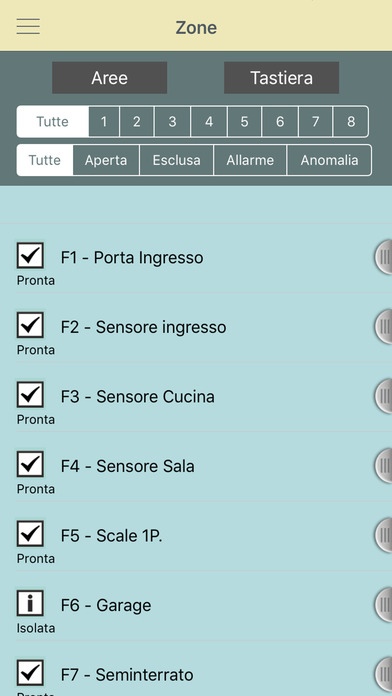
From the panel's Zones it is possiblile check the status of zones and bypass it if necessary.
From the panel's Outputs you can control the outputs of the control panel as single trigg er or in Group trigger
From the panel's Diagnostics you can see the overall system status.
From the panel's Logs you can see progressively historian of panel stored events.
From the panel's Areas you can take action on the partitions in single or multiple mode, for each arm mode. A simple graphical reports the status of arming for each areas.
From the panel's Keyboard panel is recall same graphics of the wired keypad installed on the alarm system, with same way of the keyboard connected via wire.
In particular, the features allow you to:
- totally emulate the wired keypad installed on the alarm system
- save one control panel profile and recall them from the internal database by Name
- act on the installed alarm system as well as wired touch keypad installed on the system
- act with user password validated by the wired control panel
- reproduce the sound of the buzzer system following the same of the wired keypad installed on the system
- Include / Bypass zone directly,
- Check the live status of the zones,
- Take action on Arm / Disarm areas in graphics mode,
- See the event memory in list mode,
- Turn On / Off panel's outputs in single or group trigger,
- Arm the system in Forced mode and in Instant Mode ( no delay ),
- Check the full panel diagnostic status.
By default the application has pre-programmed data from one profile to connect to a Demo control panel The profile is freely programmable and can be created unlimited controllable control panel's profiles.
ATTENTION, THIS UPGRADE IS NOT AN UPDATE OF THE CURRENT APP FEE CALLED STS e-bus Keypad LE. IS A NEW VERSION (PRO) WHICH FIX THE END OF DEVELOPMENT ON PREVIOUS VERSION.
It 'also available the Free App version (FREE) that has only the keyboard panel and can store only one control panel account profile.
To download the guide go to sito http://www.stselettronica.cc or send an email to info@stselettronica.cc
For any questions or assistance please send an email to info@securforce.com
Requires iOS 8.0 or later. Compatible with iPhone, iPad, and iPod touch.
About STS e-bus Keypad Pro
The company that develops STS e-bus Keypad Pro is Evoforce srl. The latest version released by its developer is 2.1.
To install STS e-bus Keypad Pro on your iOS device, just click the green Continue To App button above to start the installation process. The app is listed on our website since 2016-09-07 and was downloaded 0 times. We have already checked if the download link is safe, however for your own protection we recommend that you scan the downloaded app with your antivirus. Your antivirus may detect the STS e-bus Keypad Pro as malware if the download link is broken.
How to install STS e-bus Keypad Pro on your iOS device:
- Click on the Continue To App button on our website. This will redirect you to the App Store.
- Once the STS e-bus Keypad Pro is shown in the iTunes listing of your iOS device, you can start its download and installation. Tap on the GET button to the right of the app to start downloading it.
- If you are not logged-in the iOS appstore app, you'll be prompted for your your Apple ID and/or password.
- After STS e-bus Keypad Pro is downloaded, you'll see an INSTALL button to the right. Tap on it to start the actual installation of the iOS app.
- Once installation is finished you can tap on the OPEN button to start it. Its icon will also be added to your device home screen.
Program Details
System requirements
Download information
Pricing
Version History
version 2.1
posted on 2016-09-07
Disclaimer
Official App Store Link
We do not host STS e-bus Keypad Pro on our servers. We did not scan it for viruses, adware, spyware or other type of malware. This app is hosted by Apple and passed their terms and conditions to be listed there. We recommend caution when installing it.
The App Store link for STS e-bus Keypad Pro is provided to you by apps112.com without any warranties, representations or guarantees of any kind, so access it at your own risk.
If you have questions regarding this particular app contact the publisher directly. For questions about the functionalities of apps112.com contact us.
